
 100% FREE ACCESS
11th Standard Syllabus & Materials
11th Standard
TN 11th Tamil இயற்கை வேளாண்மை,சுற்றுச்சூழல் -செய்யுள் - மனோன்மணீயம் Important Questions And Answers Study Material - QB365 Set A
NEW11th Standard
TN 11th Tamil என்னுயிர் என்பேன் -துணைப்பாடம் - இசைத்தமிழர் இருவர் Important Questions And Answers Study Material - QB365 Set A
NEW11th Standard
TN 11th Tamil மொழி கலை -செய்யுள் - ஒவ்வொரு புல்லையும் Important Questions And Answers Study Material - QB365 Set A
NEW11th Standard
TN 11th Tamil பீடு பெற நில் - இலக்கணம் - பகுபத உறுப்புகள் Important Questions And Answers Study Material - QB365 Set A
NEW11th Standard
TN 11th Tamil பீடு பெற நில் - துணைப்பாடம் - வாடிவாசல் Important Questions And Answers Study Material - QB365 Set A
NEW11th Standard
TN 11th Tamil பீடு பெற நில் - செய்யுள் - குறுந்தொகை Important Questions And Answers Study Material - QB365 Set A

Published on: 13/05/2022
QB365 provides detailed and simple solution for every book back questions in class 11 Computer Applications subject.It will helps to get more idea about question pattern in every book back questions with solution.
latest Book back QuestionsDownload Tamil Nadu 11th Standard Computer Applications question papers, model tests, one-mark questions, important questions, and public exam papers in PDF format. Free study materials and answer keys for TN State Board students.
Questions + Answers key
Take MCQ Computer Applications Test
1.
Write HTML code to create the following table:
| A | B | |||
| C | D | E | G | |
| F | ||||
2.
What is Link and explain the types of links.
3.
Explain the types of list with suitable HTML code.
4.
Explain the attributes used with < table > tag in HTML.
5.
Write an HTML code the show the following text:
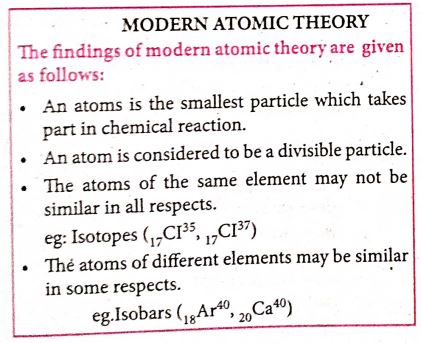
1.
< /tables >
< table border=1 cellspacing=0 cellpadding=16 >
< tr >
< td rowspan=3 VAlign=top > A< /td >
< th colspan=4 > B< /th >
< /tr >
< td > C< /td >
< td > D< /td >
< td > E< /td >
< td rowspan=2 VAlign=top > G< /td >
< /tr >
< tr >
< th colspan=3 > F< /th >
< /table >
2.
Link isan important feature of HTML to connect web resources. Link in HTML is used to create hyperlinks to web content. Web content may be an HTML document or an external webpage or any multimedia content such as an image, video, audio, animation etc., or even a part of the current document.
There are two important things needed to create a link in HTML,
1. The name of the file or URL to Which you want to link
2. The text that will serve as the clickable link.
The anchor tag < A > is used to create links along with HREF attribute. HREF is abbreviated as "Hypertext Reference".
Internal Links: Creating a link to a particular section of the same document is known as Internal Link. To create an internal link, the attribute Name is used along with < A > tag. The Name attribute of < A > tag establish the link to the content within the document.
An HTML code to demonstrate Internal Linking:
< html >
< head >
< title > South India< /title >
< /head >
< body >
< A href = #TN > Tamil Nadu < /A >
< A Name =TN > < B > Tamilnadu < /B > < /A >
< p > Tamil Nadu literally 'The Land of Tamils' or 'Tamil Country' is one of the 29 states of India. Its capital and largest city is Chennai (formerly
known as Madras). < /p >
< /body >
< /html >
External Links : To Establish link with an external web page in known as external link. It is created by províding the URL of the external file in the HREF attribute of < A > tag of the current page.
An HTML code to demonstrate Internal Linking with an external websisite/webpage:
< html >
< head >
< title > Links< /title >
< /head >
< body >
< hI align=center >
Welcome to < br >
< A href= "http://www.tnscert.org" >
State Council of Educational Research and Training, Tamilnadu < /A >
< /h1 >
< /body >
< /html >
3.
HTML supports three types of lists viz. numbered, unnumbered and definition. These lists are called as Ordered List, Unordered List and Definition List respectively.
(1) Numbered List /Ordered List :Numbered listis created within the tag pair < OL > .........< OL > tag. The tag < LI > is used to present the list item in the list. Ordered list displays items in a numerical or alphabetical order. Both < OL > and < LI > tags are container tags. But the usual the practice, closing tag < /LI > is normally not used.
Program :
< html >
< head >
< title > Number List < /title >
< /head >
< body >
< OL >
< LI > Tamil
< LI > Telugu
< LI > English
< LI > Computer Application
< LI > Commerce
< LI > Accountancy
< LI > Economics
< /OL >
< /body >
< /html >
The output will be:
1. Tamil
2. Telugu
3. English
4. Computer Application
5. Commerce
6. Accountancy
7. Economics
(ii) Un-numbered List / Unordered List: Unordered lists are often referred as bulleted lists.Instead of numbers, each element in the list is prefixed with a special bullet symbol. Unordered list is surrounded within < UL > .........< /UL > tags. As discussed above, each list element is defined by < LI > tag.
Program:
< html >
< head >
< title > Unordered List < /title >
< /head >
< body >
< UL >
< LI > Chennai G Hr. Sec. School, Rotler Street, Chennai 600 112.
< LI > Karnakata Sanga Hr. Sec School, T. Nagar, Chennai 600 017.
< LI > S.M.B. Jain Hr. Sec. School, T. Nagar, Chennai 600 017.
< LI > Chennai G Hr. Sec. School, Nungambakkam, Chennai 600 034.
< LI > Chennai G Hr. Sec. School. Saidapet West,Chennai 600015
< LI > Santhome Hr. Sec. School, Mylapore, Chennai 600 004.
< /UL >
< /body >
< /html >
The output will be:
Chennai G Hr. Sec. School, Rotler Street, Chennai 600 112.
Karnakata Sanga Hr. Sec. School, T. Nagar, Chennai 600 017.
S.M.B. Jain Hr. Sec. School, T. Nagar, Chennai 600 017.
Chennai G Hr. Sec. School, Nungambakkam, Chennai 600 034.
Chennai G Hr. Sec. School, Saidapet West, Chennai 600 015.
Santhome Hr. Sec. School, Mylapore, Chennai 600 004.
(iii) Definition List :Definition list is different from other two types of list. No bullet or number is provided for the list items. In this list type, list the element has two parts.
1. A definition term
2. The definition description
Definiion list is surrounded within < DL > ............... < /DL > tags.
Definition term is presented in between < DT > ...............< /DT > tag and
Definition description should be surrounded within < DD > ..........< /DD > tag.
Program:
< html >
< head >
< title > Definition List < /title >
< /head >
< body >
< DL >
< DT > HTML< /DT >
< DD > Hyper Text Markup Language < /DD >
< DT > Webpage:< /DT >
< DD > A web page is a document that is suitable for the World Wide Web and web browsers, A web browser displays aweb page on a monitor or mobile device. < /DD >
< /DL >
< /body >
< html >
The output will be:
HTML:
Hyper Text Markup Language
Webpage :
A web page is a document that is suitable for the World Wide Web and web browsers. A web browser displays a web page on a monitor or mobile device.
4.
The <table> is a container tag. There are several attributes to improve the layout of the table. They are listed below:
(i) Cellspacing : It is used to set the space between cells in a table.The value should be in pixels.
(ii) Cellpadding: It is used to set the space between the contents of a cell and its border the value should be in pixels.
(iii) Border : Border attribute with <table> tag is used to specify the thickness of the border lines around the table. The value of the border attribute should be non zero value in pixels. If its value is zero, HTML displays the table without border. The default value is Zero in most of the browsers.
(iv) Bordercolor : It is used to apply colour to the border lines.
(v) Align : It is used to set the position of the table within the browser window. Left is the default position. Right or centre may be the value of align attribute.
(vi) BGcolor : It is used to apply background colour to the table.
(vii) Height and Width : These two attributes are used to specify the height and width of a table in terms of pixels or percentage.
5.
<html>
<body>
<h1><centre>modern atomic theory
</centre></h1><br>
<b>The findings of modern atomic theory are given as follows: </B><BR>
<ul>
<li> An atom is the smallest particle which takes part in chemical reaction.
<li> An atom is considered to be a divisible particle.
<li> The atoms of the same element may not be similar in all respects<BR>
eg: Isotopes (<sub>17</sub>(1<sup>35</sup>,<sub>17</sub>(1<sup>37<1sup>)
<li> The atoms of different element may be similary in some respects <BR>
eg: Isobars(<sub>18</sub>Ar<sup>40</sup>,<sub>20</sub>(a<sup>40</sup>)
</ul>
</body>
</html>

11th Standard Syllabus & Materials
11th Standard
TN 11th Tamil பீடு பெற நில் - செய்யுள் - காவடிச்சிந்து Important Questions And Answers Study Material - QB365 Set A
NEW11th Standard
TN 11th Tamil பீடு பெற நில் - உரைநடை - மலை இடப்பெயர்கள் : ஓர் ஆய்வு Important Questions And Answers Study Material - QB365 Set A
NEW11th Standard
TN 11th Tamil மாமழை போற்றுதும் - துணைப்பாடம் - யானை டாக்டர் Important Questions And Answers Study Material - QB365 Set A
NEW11th Standard
TN 11th Tamil மாமழை போற்றுதும் - செய்யுள் - ஐங்குறுநூறு Important Questions And Answers Study Material - QB365 Set A



Tamilnadu Stateboard 11th Standard Subjects

Maths

Commerce

Economics

Biology

Business Maths and Statistics

Accountancy

Computer Science

Physics

Chemistry
Maths
Biology
Economics
Physics
Chemistry

History
Business Maths and Statistics

Computer Science
Accountancy
Computer Applications
History
Computer Technology
Commerce
Computer Applications
Computer Technology

Tamil

English

French
Tamilnadu Stateboard Standards


