
 100% FREE ACCESS
11th Standard Syllabus & Materials
11th Standard
TN 11th Tamil இயற்கை வேளாண்மை,சுற்றுச்சூழல் -செய்யுள் - மனோன்மணீயம் Important Questions And Answers Study Material - QB365 Set A
NEW11th Standard
TN 11th Tamil என்னுயிர் என்பேன் -துணைப்பாடம் - இசைத்தமிழர் இருவர் Important Questions And Answers Study Material - QB365 Set A
NEW11th Standard
TN 11th Tamil மொழி கலை -செய்யுள் - ஒவ்வொரு புல்லையும் Important Questions And Answers Study Material - QB365 Set A
NEW11th Standard
TN 11th Tamil பீடு பெற நில் - இலக்கணம் - பகுபத உறுப்புகள் Important Questions And Answers Study Material - QB365 Set A
NEW11th Standard
TN 11th Tamil பீடு பெற நில் - துணைப்பாடம் - வாடிவாசல் Important Questions And Answers Study Material - QB365 Set A
NEW11th Standard
TN 11th Tamil பீடு பெற நில் - செய்யுள் - குறுந்தொகை Important Questions And Answers Study Material - QB365 Set A

Published on: 13/05/2022
QB365 provides detailed and simple solution for every book back questions in class 11 Computer Science subject.It will helps to get more idea about question pattern in every book back questions with solution.
latest Book back QuestionsDownload Tamil Nadu 11th Standard Computer Science question papers, model tests, one-mark questions, important questions, and public exam papers in PDF format. Free study materials and answer keys for TN State Board students.
Questions + Answers key
Take MCQ Computer Science Test
1.
What is piracy? Mention the types of piracy? How can it be prevented?
2.
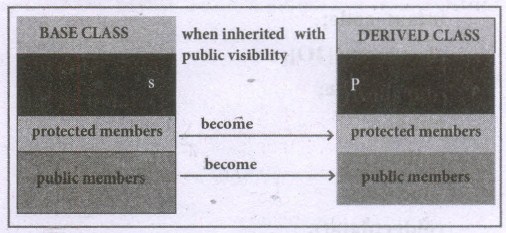
Explain the different visibility mode through pictorial representation.
3.
Write a note on the basic concepts that suppors OOPs?
4.
Write the output of the following c++ program
#include <iostream>
#include <string>
using namespace std;
struct student
{
introll_no;
char name[10];
long phone_number;
};
int main(){
student p1 = {1,"Brown",123443},p2;
p2.roll_no = 2;
strcpy(p2.name ,"Sam");
p2.phone_number = 1234567822;
cout<< "First Student" <<endl;
cout<< "roll no : " << p1.roll_no <<endl<< "name : " << p1.name <<endl;
cout<< "phone no : " << p1.phone_number <<endl;
cout<< "Second Student" <<endl;
cout<< "roll no : " << p2.roll_no <<endl<< "name : " << p2.name <<endl;
cout<< "phone no : " << p2.phone_number <<endl;
return 0;
}
5.
Write a c++ program to declare and accept an array of professors. Display the details of the department = ”COMP.SCI” and the name of the professors start with ‘A’. The structure “college” should contain the following members.
prof_id as integer
name and Department as character array
6.
How call by reference is used to pass structure to a function .Give an Example
7.
Explain array of structures with example
8.
Explain scope of variable with example.
9.
What is Recursion? Write a program to find the factorial of the given number using recursion.
10.
Write a program to find sum of the series
S = 1 + x + x2 +..... + xn
11.
Write a program to find the LCM and GDC of two numbers.
12.
What are the types of Errors?
13.
Exchange the contents: Given two glasses marked A and B. Glass A is full of apple drink and glass B is full of grape drink. Write the specification for exchanging the contents of glasses A and B, and write a sequence of assignments to satisfy the specification.
14.
Power can also be defined recursively as
\(a^n= \begin{cases}1 & \text { if } \mathrm{n}=0 \\ \mathrm{a} \times \mathrm{a}^{\mathrm{n}-1} & \text { if } \mathrm{n} \text { is odd } \\ \mathrm{a}^{\mathrm{n} / 2} \times \mathrm{a}^{\mathrm{n} / 2} & \text { if } \mathrm{n} \text { is even }\end{cases}\)
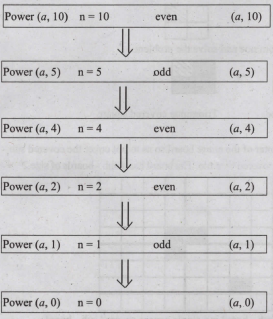
Construct a recursive algorithm using this definition. How many multiplications are needed to calculate a10?
15.
Explain the Derived gates with expression and truth table.
16.
Complete the following matrix.
| Navigational method | Located on | Ideally suited for |
|---|---|---|
| Start button | Task bar | |
| Desktop | Exploring your disk drives and using system tools. | |
| Windows Explorer | Seeing the hierarchy of all computer contents and resources in one window. | |
| Quick Launch |
17.
Explain the fundamental gates with expression and truth table.
18.
Add 11010102 + 1011012
19.
Suppose you want to solve the quadratic equation ax2 + bx + c = 0 by an algorithm.
quadratic_solve (a, b, c)
-- inputs : ?
-- outputs: ?
You intend to use the formula and you are prepared to handle only real number roots. Write a suitable specification.
\(x = {-b \pm \sqrt{b^2-4ac} \over 2a}\)
20.
21.
22.
Explain the types of ROM.
23.
Convert (98.46)10 to Binary.
24.
List out the points to be noted while creating a user interface for an Operating system.
25.
How the read and write operations are performed by a processor? Explain.
1.
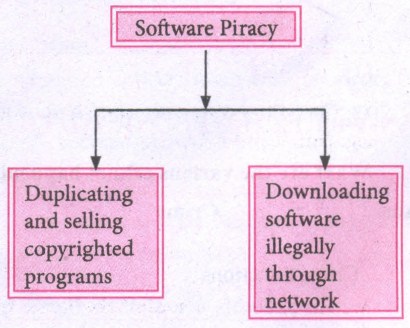
Software Piracy is about the copyright violation of software created originally by an individual or an institution. It includes:
(i) stealing of codes / programs and other information illegally and creating duplicate copies by unauthorized means and utilizing this data either for one's own benefit or for commercial profit.
(ii) Downloading software from illegal network sources.
An entirely different approach to software piracy is called shareware, acknowledges the futility of trying to stop people from copying software and instead relies on people's honesty.
Shareware publishers encourage users to give copies of programs to friends and colleagues but ask everyone who uses that program regularly to pay a registration fee to the program's author directly.
To prevent unauthorized access, Firewalls, Intrusion Detection Systems (IDS), Virus and Content Scanners, Patches and Hot fixes are used.
2.
Visibility Modes :
An important feature of Inheritance is to know which member of the base class will be acquired by the derived class. This is done by using visibility modes. The accessibility of base class by the derived class is controlled by visibility modes. The three visibility modes are private, protected and public. The default visibility mode is private. Though visibility modes and access specifiers look similar, the main difference between them is Access specifiers control the accessibility of the members with in the class where as visibility modes control the access of inherited members with in the class.
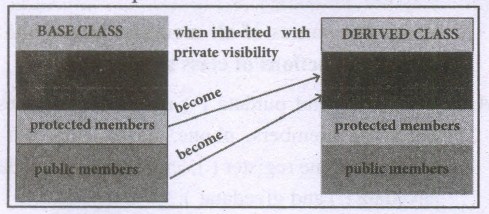
Private Visibility Mode :
When a base class is inherited with private visibility mode the public and protected members of the base class become 'private' members of the derived class.
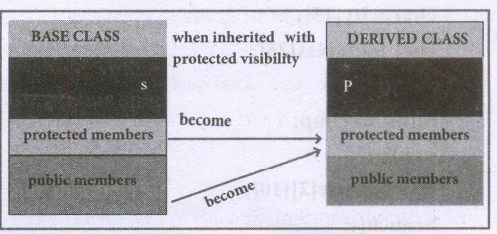
Protected Visibility Mode:
When a base class is inherited with protected visibility mode the protected and public members of the base class become 'protected members ' of the derived class.
Public Visibility Mode :
When a base class is inherited with public visibility mode, the protected members of the base class will be inherited as protected members of the derived class and the public members of the base class will be inherited as public members of the derived class.
3.
The Object Oriented Programming has been developed to overcome the drawbacks of procedural and modular programming. It is widely accepted that object-oriented programming is the most important and powerful way of creating software.
The Object-Oriented Programming approach mainly encourages:
1. Modularization: where the program can be decomposed into modules.
2. Software re-use: where a program can be composed from existing and new modules.
Main Features of Object Oriented Programming
1. Data Abstraction
2. Encapsulation
3. Modularity
4. Inheritance
5. Polymorphism
Encapsulation
The mechanism by which the data and functions are bound together into a single unit is known as Encapsulation. It implements abstraction.
Encapsulation is about binding the data variables and functions together in class, It can also be called data binding.
Encapsulation is the most striking feature of a class. The data is not accessible to the outside world, and only those functions which are wrapped in the class can access it. These functions provide the interface between the object's data and the program. This encapsulation of data from direct access by the program is called data hiding or information hiding.
Classes use the concept of abstraction to define a list of abstract attributes and function which operate on these attributes. They encapsulate all the essential properties of the object that are to be created. The attributes are called data members because they hold information. The functions that operate on these data are called methods or member function.
Modularity
Modularity is designing a system that is divided into a set of functional units (named modules) that can be composed into a larger application.
Inheritance
Inheritance is the technique of building new classes (derived class) from an existing Class (base class). The most important advantage of inheritance is code reusability.
Polymorphism
Polymorphism is the ability of a message or function to be displayed in more than one form.
4.
Output:
First Student roll no: 1
name: Brown
phone no: 123443
Second Student roll no: 2
name: Sam
Phone no : 1234567822
Third Student roll no: 3
name :Addy
Phone no : 1234567844
5.
#incluede< iostream >
using namespace std;
#include< string.h >
struct college
{
int prof.id;
char pname[20];
char dept[20];
} p[10];
int main()
{
int i;
for (i=0; i<10; i++)
{
cout << "Enter professor.id'' << endl;
cin >> p[i].prof_d;
cout << "Enter proferssor name'' << endl:
cin >> p[i].pname;
cout << "Enter department'' << endl;
cin >> p[i].dept;
}
for(i=0;i < 10; i++)
{
int flag= 1;
if(p[i].dept== "COMP.SCI"&& p[i].pname='A')
cout << p[i].prof id << endl;
cout << p[i].pname << endl;
cout << p[i].dept << endl;
}
if(flag==0)
cout << "The given details not found" << endly
return 0;
}
6.
Call by reference :
In this method of passing the structures to functions, the address of a structure variable /object is passed to the function using address of (&) operator. So any change made to the contents of structure variable inside the function are reflected back to the calling function.
#include< iostream >
using namespace std;
struct Employee {
char name[50];
int age;
float salary;
};
void readData(Employee&);
void printData(Employee);
int main()
{
Employee p;
readData(p );
printData(p );
return 0;
}
cout << "Enter Full Name:";
cin.get(p.name,50);
cout << "Enter age:";
cir >> p.age;
cout << "Enter salary:";
cin >> p.salary:
}
void printData(Employee p)
{
cout << "Name: " << p.narne << endl;
cout << "Age:" << p.age << endl;
cout << " Salary: " << p.salary;
}
Output.
Enter Full name: Kumar
Enter age: 55
Enter salary: 34233.4
Displaying Information.
Name: Kumar
Age: 55
Salary: 34233.4
7.
An array of structures is declared in the same way as declaring and array with built-in data types like int or char. A class may contain many students. So, the definition of structure for one student can also be extended to all the students. If the class has 20 students, then 20 individual structures are required. For this purpose, an array of structures can be used
The following program read the details of 20 students and prints the same.
#include< iostream >
using namespace std;
struct Student
{
int age;
float height, weight;
char name[30];
};
void main()
{
Student std[20];
int i;
cout << "Enter the details for 20 students" << endl;
for(i=0;i<20;i++ )
cout << " Enter the details of student'' << i+ 1<< endl;
cout << " Enter the age:"<< endl;
cin >> std[i].age;
cout << "Enter the height:" << endl;
cin >> std[i].height;
cout << "Enter the weight" << endl;
cin >> std[i].weight;
}
cout << "The values entered for Age, height and weight are''<
cout << "Student'' << i+ 1<< "\t" << std[i].age << "\
cout << "std[i].height << "\t" << std[i].weight;
}
8.
Scope refers to the accessibility of a variable.
There are four types of scopes in C++
(i) Local Scope
(ii) Function Scope
(iii) File Scope
(iv) Class Scope
(i) Local Scope
1. A local variable is defined within a block. A block of code begins and ends with curly braces {}.
2. The scope of a local variable is the block in which it is defined.
3. A local variable cannot be accessed from outside the block of its declaration.
4. A local variable is created upon entry into its block and destroyed upon exit;
Example:
int main()
{
int a,b; //Local variable
}
(ii) Function Scope
1. The scope of variable within a function is extended to the function block and all sub-blocks therein.
2. The lifetime of a function scope variable is the lifetime of the function block.
Example:
int sum(intx, int y); //x and y has function scope.
(iii) File Scope
1. A variable declared above all blocks and functions (including main()) has the scope of a file.
2. The lifetime of a file scope variable is the lifetime of a program.
3. The file scope variable is also called as global variable.
Example:
#include<iostream>
using namespace std;
int x,y; // x and y are global variable
void main()
{
,,,,,
}
(iv) Class Scope
1. Data members declared in a class has the class scope.
2. Data members declared in a class can be accessed by all member functions of the class.
Example:
Class example
{
int x,y; //x and y can be accessed by print() and void():
void print():
void total();
};
9.
A function that calls itself is known as recursive function. And, this technique is known as recursion.
#include
int factorial(int);//Function prototype//
int main ()
{
int no;
cout <<"\nEnter a number to find its factorial;";
cin>>no;
cout <<"\nFactorial of Number" < return 0;
}
int factorial(int m)
{
if (m>1)
{
return m*factorial(m-1);
}
else
{
return 1;
}
}
Output:
Enter a number to find its factorial: 5
Factorial of Number 5 = 120
10.
#include <iostream>
using namespace std;
#include <math.h>
int main()
{
int x, n;
float sum= 0;
cout<<"Enter the value for x:";
cin>>x;
cout<<"Enter the number of terms";
cin>>n;
for (int i=0; i<n; i++)
sum = sum + Pow(x,i);
cout<<"Sum="<< Sum<<endl;
cin.get();
return 0;
}
11.
#include <iostream>
using namespace std;
int main()
{
int a1, b1 lem, ged-1, p;
cout << "\n Enter 1st no:";
cin>>a1;
cout << "\n Enter 2nd no:";
cin >> b1;
p=a1*b1;
for (int i = al; i<-p; i++)
if (i%al == 0) && (i%b1 == 0)
{
1cm=i;
break;
}
cin.get():
cout << "L.C.M. =" <<lcm<<endl;
gcd=p/LCM;
cout<<"G.C.D="<< ged;
cin.get():
return 0;
}
12.
| Type of Error | Description |
| Syntax Error | Syntax errors occur when grammatical rules of C++ are violated. |
| Semantic Error | Semantic Error occur when there is wrong use of variable/ operator/order of execution etc. It is also called as Logical Error. |
| Run-time error | A run time error occurs during the execution of a program. It is occurs because of some illegal operation that takes place. |
13.
Let the variables a, b, c represent Glass A, Glass B and Glass C and a, b, c can store values APPLE, GRAPE or EMPTY.
Specification:
1 exchange (a, b)
2-inputs: a, b: APPLE, GRAPE
3-outputs: a, b: = GRAPE, APPLE
Algorithm:
1. exchange (a, b)
2. a, b, c := APPLE, GRAPE, EMPTY.
3. c:=b
4. -- a, b, c := APPLE, EMPTY, GRAPE,
5. b:= a
6. -- a, b, c := APPLE, EMPTY, GRAPE,
7. a := c
8. --a, b, c := GRAPE, APPLE, EMPTY
14.
power (5,2) = 5 × 5 = 25
power (x, n) raise x to the power n
Algorithm :
power (x, n)
If n = 0 -- base case
1
else --recursion step
if n is odd
x * power (x, n - 1)
else
p = power (x, n/2)
p * p
To find a 10 :
15.
The logic gates like NAND, NOR, XOR and XNOR are derived gates which are derived from the fundamental gates AND, OR, NOT.
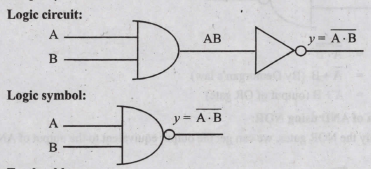
(1) NAND gate:
The NAND is the combination of NOT and AND. The NAND is generated by inverting the output of an AND operation.
Output: y = \(\overline { \left( A.B \right) } \)
the truth table for NOR gate is
| Input | Output | |
| A | B | y = \(\overline { \left( A.B \right) } \) |
| 0 | 0 | 1 |
| 0 | 1 | 0 |
| 1 | 0 | 0 |
| 1 | 1 | 0 |
(ii) NOR gate:
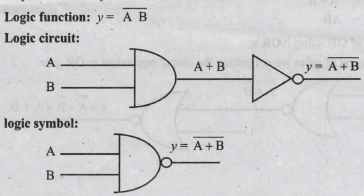
The NOR is the combination of NOT and OR. The NOR is generated by inverting the output of an OR operation.
Logic function: y = \(\overline { \left( A+B \right) } \)
the truth table for NOR gate is
| Input | Output | |
| A | B | y = \(\overline { \left( A+B \right) } \) |
| 0 | 0 | 1 |
| 0 | 1 | 0 |
| 1 | 0 | 0 |
| 1 | 1 | 0 |
(iii) XOR gate:
The XOR (exclusive - OR) gate acts in the same way as the logical either /or.
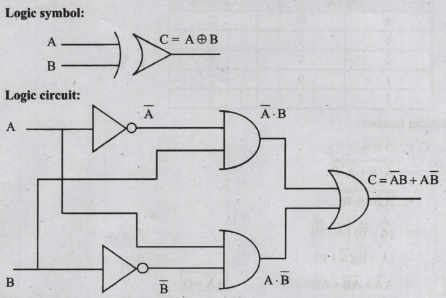
the truth table
| Input | Output | |
| A | B | C |
| 0 | 0 | 0 |
| 0 | 1 | 1 |
| 1 | 0 | 1 |
| 1 | 1 | 0 |
(iv) XNOR gate:
XNOR (exclusive - NOR) gate is a combination of XOR gate followed by an inverter.
Logic function: y= \(\overline { A \ B } \)
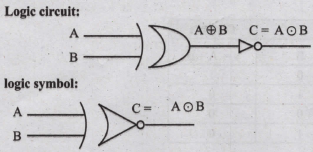
the truth table
| Input | Output | |
| A | B | C |
| 0 | 0 | 1 |
| 0 | 1 | 0 |
| 1 | 0 | 0 |
| 1 | 1 | 1 |
Boolean function:
\(\mathrm{C} =\overline{\mathrm{A} \oplus \mathrm{B}} \)
\(=\overline{{\overline{\mathrm{A}}} \cdot \mathrm{B}+\mathrm{A} \cdot \overline{\mathrm{B}}} \)
\(=\overline{\overline{\mathrm{A}} \cdot \mathrm{B}} \cdot \overline{\mathrm{A} \cdot \overline{\mathrm{B}}} \)
\(=(\overline{\mathrm{A}}+\overline{\mathrm{B}})(\overline{\mathrm{A}}+\overline{\bar{B}}) \)
\(=(\mathrm{A}+\overline{\mathrm{B}})(\overline{\mathrm{A}}+\mathrm{B}) \)
\(=\mathrm{A} \overline{\mathrm{A}}+\overline{\mathrm{AB}}+\mathrm{AB}+\mathrm{B} \overline{\mathrm{B}} \quad \mathrm{A \overline {A }}=\mathrm{O}\)
\(\mathrm{C} =\overline{\mathrm{A}} \overline{\mathrm{B}}+\mathrm{AB}\)
16.
| S.No | Navigational method | Located on | Ideally suited for |
|---|---|---|---|
| 1. | Start button | Task bar | Quick access common apps and settings |
| 2. | My computer | Desktop | Exploring your disk drives and using system tools. |
| 3. | Windows Explorer | Task bar | Seeing hierarchy of all computer contents and resources in one window. |
| 4. | Quick Launch | Task bar | To open the programs quickly. |
17.
A gate is a basic electronic circuit which operates on one or more signals to produce an output signal.
The three fundamental gates are AND, OR and NOT gates.
AND Gate
The AND gate can have two or more input signals and produce an output signal. The output is "true" only when both inputs are "true", otherwise, the output is "false". In other words the output will be 1 if and only if both inputs are 1; otherwise the output is 0. The output of the AND gate is represented by a variable say C, where A and B are two input boolean variables. In boolean algebra, a variable can take either of the values '0' or '1'. The logical symbol of the AND gate is
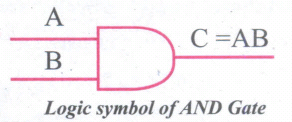
The Truth Table For AND Gate is
| Input | Output | |
| A | B | C |
| 0 | 0 | 0 |
| 0 | 1 | 0 |
| 1 | 0 | 0 |
| 1 | 1 | 1 |
OR Gate;
The OR gate gets its name from its behaviour like the logical inclusive "OR". The output is "true" if either or both of the inputs are "true". If both inputs are "false" then the output is "false". In other words the output will be 1 if and only if one or both inputs are 1; otherwise, the output is 0. The logical symbol of the OR gate is
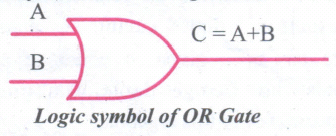
The truth table For OR Gate is
| Input | Output | |
| A | B | C |
| 0 | 0 | 0 |
| 0 | 1 | 1 |
| 1 | 0 | 0 |
| 1 | 1 | 1 |
NOT Gate;
The NOT gate, called a logical inverter, has only one input. It reverses the logical state. In other words the output C is always the complement of the input. The logical symbol of the NOT gate is
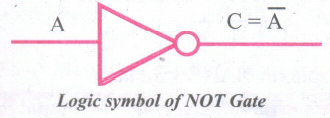
The truth table for NOT gate is
| Input | Output |
| A | C |
| 1 | 0 |
| 0 | 1 |
18.
11010102 + 1011012
1101010
+101101
________
10010111
________
11010102 + 1011012 = 100101112
19.
x\(= {-b \pm \sqrt{b^2-4ac} \over 2a}\)
1. Quadratic solve (a, b, c)
2. -- inputs: b²-4ac > = 0 where a, b, c are real numbers, a ≠ 0
3. -- outputs: x1 and x2 are real numbers such that a(x1)² + bx1 + c = 0 and a(x₂)² + bx₂ + c = 0
20.
21.
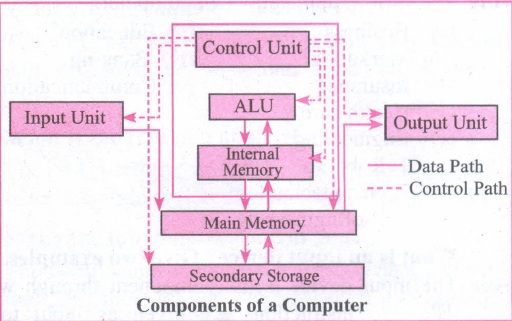
22.
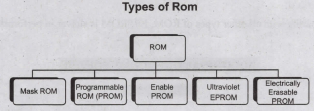
Read-only memory (ROM):
1. Read-Only Memory refers to special memory in a computer with pre-recorded data at manufacturing time which cannot be modified.
2. The stored programs that start the computer and perform diagnostics are available in ROMs. ROM stores critical programs such as the program that boots the computer.
3. Once the data has been written onto a ROM chip, it cannot be modified or removed and can only be read.
4. ROM retains its contents even when the computer is turned off. So, ROM is called as a non-volatile memory.
Programmable Read-Only Memory (PROM):
1. Programmable read-only memory is also a nonvolatile memory on which data can be written only once. Once a program has been written onto a PROM, it remains there forever.
2. Unlike the main memory, PROMs retain their contents even when the computer is turned off.
3. The PROM differs from ROM. PROM is manufactured as a blank memory, whereas a ROM is programmed during the manufacturing process itself.
4. PROM programmer or a PROM burner is used to write data to a PROM chip. The process of programming a PROM is called burning the PROM.
Erasable Programmable Read-Only Memory (EPROM):
1. Erasable Programmable Read-Only Memory is a special type of memory which serves as a PROM, but the content can be erased using ultraviolet rays.
2. EPROM retains its contents until it is exposed to ultraviolet light. The ultraviolet light clears its contents, making it possible to reprogram the memory.
3. An EPROM differs from a PROM. PROM can be written only once and cannot be erased.
4. EPROMs are used widely in personal computers because they enable the manufacturer to change the contents of the PROM to replace with updated versions or erase the contents before the computer is delivered.
Electrically Erasable Programmable Read-Only Memory (EEPROM)
1. Electrically Erasable Programmable Read-Only Memory is a special type of PROM that can be erased by exposing it to an electrical charge.
2. Like other types of PROM, EEPROM retains its contents even when the power is turned off.
3. Comparing with all other types of ROM, EEPROM is slower in performance.
23.
98.4610
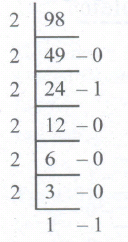
2. Fractional part
0.46 x 2 = 0.92 = 0
0.92 x 2 = 1.84 = 1
0.84 x 2 = 1.68 = 1
0.68 x 2 = 1.36 = 1
0.36 x 2 = 0.72 = 0
0.72 x 2 = 1.44 = 1
98.4610 = (1100010.011101...)2
24.
The main purpose of using an operating system:
(i) It controls and coordinates all the activities of a computer system.
(ii) It provides an environment for a computer user to execute programs on computer hardware in a convenient and efficient manner.
(iii) It enables the user to design the application, and also it provides an interface to interact with the computer and controls the execution of all kinds of programs without knowing the internals of the hardware.
(iv) It interprets the command and instructions to perform the specified tasks.
(v) It coordinates and assigns the compilers, assemblers, utility programs to the users.
(vi) It detects errors present in the hardware and software.
(vii) It maintains the internal time clock.
(viii) It protects itself from being destroyed by any users.
(ix) It serves two major functions
1. Supervision (Prevent errors)
2. Management (Operation and control of I/O devices)
(x) It loads the program itself into memory so that user can interact with hardware and software.
25.
1. The Central Processing Unit(CPU) has a Memory Data Register (MDR) and a Memory Address Register (MAR).
2. The Memory Data Register (MDR) keeps the data which is transferred between the memory and the CPU. The Program Counter (PC) is a special register in the CPU which always keeps the address of the next instruction to be executed.
3. The Arithmetic and Logic unit of CPU places the address of the memory to be fetched, into the Memory Address Register.
4. A bus is a collection of wires used for communication between the internal components of a computer.
5. The address bus is used to point a memory location. A decoder, a digital circuit is used to point to the specific memory location where the word can be located.
6. The address register is connected with the address bus, which provides the address of the instruction. A data bus is used to transfer data between the memory and the CPU.
7. The data bus is bidirectional and the address bus is unidirectional. The control bus controls both read and write operations.
8. The read operation fetches data from memory and transfers to MDR. A single control line performs two operations like Read/Write using 1 or 0.
9. Also, the write operation transfers data from the MDR to memory. This organization is shown below.
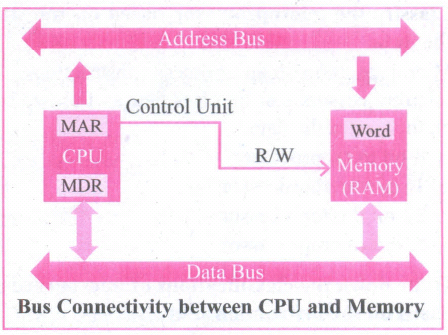
10. The word in the RAM has the same size (no. of bits) as the Memory Data Register (MDR). If the processor is an 8-bit RAM processor like Intel 8085, its MDR and the word in both have 8 bits.
11. If the size of the MDR is eight bits, which can be connected with a word in the memory which is also eight bits size. The data bus has eight parallel wires to transfer data either from MDR to word or word to MDR based on the control(Read or write).
.png)
12. This control line is labeled as which becomes 1 means READ operation and 0 means WRITE operation.
.png)
14. These pictures show the contents of MDR and the word before and after the READ operation.
i. The read operation transfers the data(bits) from word to Memory Data Register.
ii. The write operation transfers the data(bits) from Memory Data Register to word.

11th Standard Syllabus & Materials
11th Standard
TN 11th Tamil பீடு பெற நில் - செய்யுள் - காவடிச்சிந்து Important Questions And Answers Study Material - QB365 Set A
NEW11th Standard
TN 11th Tamil பீடு பெற நில் - உரைநடை - மலை இடப்பெயர்கள் : ஓர் ஆய்வு Important Questions And Answers Study Material - QB365 Set A
NEW11th Standard
TN 11th Tamil மாமழை போற்றுதும் - துணைப்பாடம் - யானை டாக்டர் Important Questions And Answers Study Material - QB365 Set A
NEW11th Standard
TN 11th Tamil மாமழை போற்றுதும் - செய்யுள் - ஐங்குறுநூறு Important Questions And Answers Study Material - QB365 Set A



Tamilnadu Stateboard 11th Standard Subjects

Maths

Commerce

Economics

Biology

Business Maths and Statistics

Accountancy
Computer Science

Physics

Chemistry
Maths
Biology
Economics
Physics
Chemistry

History
Business Maths and Statistics

Computer Science
Accountancy

Computer Applications
History
Computer Technology
Commerce
Computer Applications
Computer Technology

Tamil

English

French
Tamilnadu Stateboard Standards


