
 100% FREE ACCESS
11th Standard Syllabus & Materials
11th Standard
TN 11th Tamil இயற்கை வேளாண்மை,சுற்றுச்சூழல் -செய்யுள் - மனோன்மணீயம் Important Questions And Answers Study Material - QB365 Set A
NEW11th Standard
TN 11th Tamil என்னுயிர் என்பேன் -துணைப்பாடம் - இசைத்தமிழர் இருவர் Important Questions And Answers Study Material - QB365 Set A
NEW11th Standard
TN 11th Tamil மொழி கலை -செய்யுள் - ஒவ்வொரு புல்லையும் Important Questions And Answers Study Material - QB365 Set A
NEW11th Standard
TN 11th Tamil பீடு பெற நில் - இலக்கணம் - பகுபத உறுப்புகள் Important Questions And Answers Study Material - QB365 Set A
NEW11th Standard
TN 11th Tamil பீடு பெற நில் - துணைப்பாடம் - வாடிவாசல் Important Questions And Answers Study Material - QB365 Set A
NEW11th Standard
TN 11th Tamil பீடு பெற நில் - செய்யுள் - குறுந்தொகை Important Questions And Answers Study Material - QB365 Set A

Published on: 13/05/2022
QB365 provides detailed and simple solution for every Creative Questions in class 11 Computer Science Subject. It will helps to get more idea about question pattern in every Creative questions with solution.
latest Creative QuestionsDownload Tamil Nadu 11th Standard Computer Science question papers, model tests, one-mark questions, important questions, and public exam papers in PDF format. Free study materials and answer keys for TN State Board students.
Questions + Answers key
Take MCQ Computer Science Test
1.
Explain main memory and its types.
2.
Explain the cache memory.
3.
Explain the data communication between CPU and memory.
4.
Explain the ports and interfaces.
5.
Explain RAM in detail.
1.
The main memory is otherwise called as Random Access Memory. This is available in computers in the form of Integrated Circuits (ICs). It is the place in a computer where the Operating System, Application Programs and the data in current use are kept temporarily so that they can be accessed by the computer's processor. The smallest unit of information that can be stored in the memory is called as a bit. The memory can be accessed by a collection of 8 bits which is called as a byte. The bytes are referred by 'B'. If a computer has 1 megabyte of memory, then it can store 10,48,576 bytes (or characters) of information. [Hence 1MB is 1024K.B and 1 K.Bis 1024 Bytes, So 1024 x 1024 =10,48,576 Bytes).
Types of RAM
There are two basic types of RAM
1. Dynamic RAM (DRAM)
2. Static RAM (SRAM)
These two types differ in the technology they use to hold data. Dynamic RAM being a common type needs to be refreshed frequently. Static RAM needs to be refreshed less often, which makes it faster. Hence, Static RAM is more expensive than Dynamic RAM.
2.
Cache Memory:
The cache memory is a very high speed and expensive memory, which is used to speed up the memory retrieval process. Due to its higher cost, the CPU comes with a smaller size of cache memory compared with the size of the main memory. Without cache memory, every time the CPU requests the data, it has to be fetched from the main memory which will consume more time. The idea. of introducing a cache is that, this extremely fast memory would store data that is frequently accessed and if possible, the data that is closer to it.This helps to achieve the fast response- time, Where response time, (Access Time) refers to how quickly the memory can respond to a read / write request. Arrangement of cache memory between the CPU and the main memory is shown below

3.
Data communication between CPU and memory
The Central Processing Unit(CPU) has a Memory Data Register (MDR) and a Memory Address Register (MAR). The Memory Data. Register (MDR) keeps the data which is transferred between the Memory and the Cl'U. The Program Counter (PC) is a special register in the CPU which always keeps the address of the next instruction to be executed.
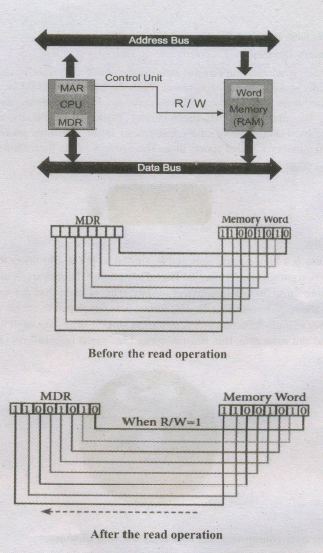
The read operation transfers the data(bits) from word to Memory Data Register. The write operation transfers the data(bits) from Memory Data Register to word.
4.
Ports and Interfaces
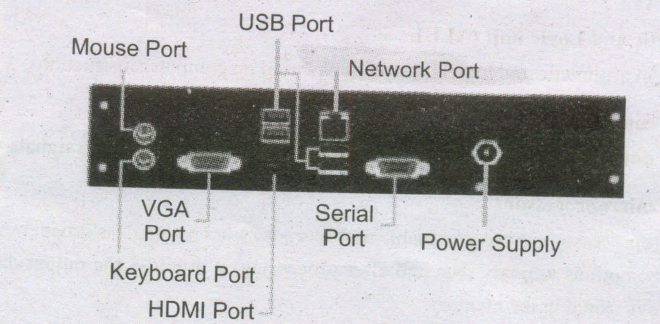
The Motherboard of a computer has many I/O sockets that are connected to the ports and interfaces found on the rear side of a computer. The external devices can be connected to the ports and interfaces. The various types of ports are given below:
Serial Port:
To connect the external devices, found in old computers.
Parallel Port:
To connect the printers,.found in old computers.
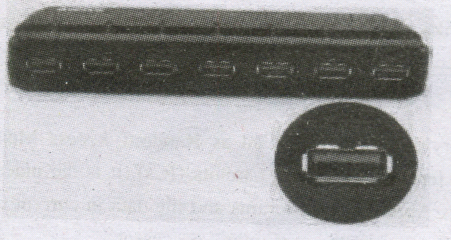
USB Ports:
To connect external devices like cameras, scanners, mobile phones, external hard disks and printers to the computer. USB 3.0 is the third major version of the Universal Serial Bus (USB) standard to connect
computers with other electronic gadgets. USB 3.0 can transfer data up to 5 Giga byte/second. USB 3.1 and USB 3.2 are also released
SCSI Port:
To connect the hard disk drives and network connectors.
5.
(i) The main memory is otherwise called as Random Access Memory. This is available in computers in the form of Integrated Circuits (ICs). It is the place in a computer where the Operating System, Application Programs and the data in current use are kept temporarily so that they can be accessed by the computer's processor.
(ii) The smallest unit of information that can be stored in the memory is called as a bit. The memory can be accessed by a collection of 8 bits which is called as a byte.
(iii) The bytes are referred by 'B'. If a computer has 1 megabyte of memory, then it can store 10,48,576 bytes. (or characters) of information. [Hence 1MB is 1024KB and 1 KB is 1024 Bytes, So 1024 x 1024 =10,48,576 Bytes].
(iv) RAM is a volatile memory, which means that the information stored in it is not permanent. As soon as the power is turned off, whatever data that resides in RAM is lost. It allows both read and write operations.
(v) There are two basic types of RAM Dynamic RAM (DRAM), Static RAM (SRAM)
(vi) These two types differ in the technology they use to hold data. Dynamic RAM being a common type needs to be refreshed frequently. Static RAM needs to be refreshed less often, which makes it faster.
(vii) Hence, Static RAM is more expensive than Dynamic RAM.

11th Standard Syllabus & Materials
11th Standard
TN 11th Tamil பீடு பெற நில் - செய்யுள் - காவடிச்சிந்து Important Questions And Answers Study Material - QB365 Set A
NEW11th Standard
TN 11th Tamil பீடு பெற நில் - உரைநடை - மலை இடப்பெயர்கள் : ஓர் ஆய்வு Important Questions And Answers Study Material - QB365 Set A
NEW11th Standard
TN 11th Tamil மாமழை போற்றுதும் - துணைப்பாடம் - யானை டாக்டர் Important Questions And Answers Study Material - QB365 Set A
NEW11th Standard
TN 11th Tamil மாமழை போற்றுதும் - செய்யுள் - ஐங்குறுநூறு Important Questions And Answers Study Material - QB365 Set A


Tamilnadu Stateboard 11th Standard Subjects
Maths

Commerce

Economics

Biology

Business Maths and Statistics

Accountancy
Computer Science

Physics

Chemistry
Maths
Biology
Economics
Physics
Chemistry

History
Business Maths and Statistics
Computer Science
Accountancy

Computer Applications
History
Computer Technology
Commerce
Computer Applications
Computer Technology
Tamil
English

French
Tamilnadu Stateboard Standards


